By JW Tool Box
How to Write Check Amounts With Cents: 05/100, Zero Cents and Examples
Last updated
A focused guide to cents fractions, zero cents, cents-only checks and rounding into the next dollar, with verified converter examples.
Why trust this guide
- Written by JW Tool Box around the actual workflow or linked tool on this page.
- Updated when browser behavior, file handling, or platform dimensions change in ways that affect the steps.
- Focused on practical settings, safe defaults, and real tradeoffs instead of generic filler.
To write $242.05 on a US check, use Two Hundred Forty-Two and 05/100 Dollars. The 05 means five cents, and the /100 means hundredths of a dollar. Put 242.05 in the numeric amount box.
Convert your dollar amount and choose Check Line. This guide focuses on cents, zero-dollar amounts and rounding. For whole-number spelling, use the written-amount guide.
The Cents Formula
[whole dollars in words] + and + [two-digit cents]/100 Dollars
Separate dollars from cents before writing. For 242.05, use Two Hundred Forty-Two plus and 05/100 Dollars. Do not spell the decimal as “point zero five” on the line shown here.
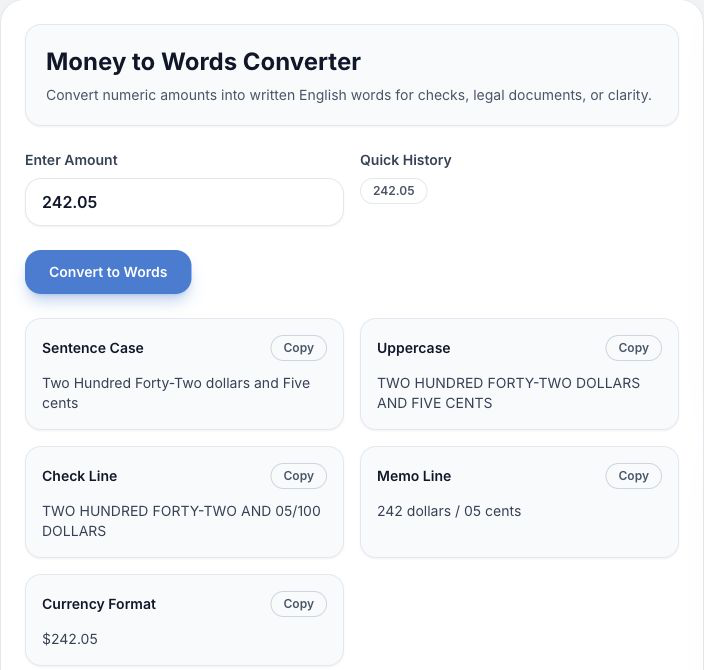
In the actual English interface, Check Line uses a cents fraction. Sentence Case instead spells out “Five cents.” Copy the format that matches the field you are completing.
Examples: Zero Cents, Small Cents and Cents Only
| Amount in the numeric box | Written amount line | Detail to check |
|---|---|---|
| $45.00 | Forty-Five and 00/100 Dollars | Zero cents stays explicit |
| $150.25 | One Hundred Fifty and 25/100 Dollars | 25 cents, not 25 dollars |
| $242.05 | Two Hundred Forty-Two and 05/100 Dollars | Keep the leading zero |
| $850.01 | Eight Hundred Fifty and 01/100 Dollars | One cent is 01/100 |
| $1,132.14 | One Thousand One Hundred Thirty-Two and 14/100 Dollars | Match both decimal digits |
| $0.50 | Zero and 50/100 Dollars | Zero whole dollars |
| $0.99 | Zero and 99/100 Dollars | Not “Ninety-Nine Dollars” |
| $12,000.50 | Twelve Thousand and 50/100 Dollars | Thousands do not change the fraction |
For more specific dollar amounts, see the common amounts chart.
Why Five Cents Is 05/100
Writing 05/100 keeps the cents portion two digits long. The numerator is the part before the slash; the denominator stays 100. Five cents (05/100) and fifty cents (50/100) represent different values, so compare the fraction with the decimal in the numeric box.
What About More Than Two Decimal Places?
Payment amounts normally use two decimal places. If you enter more, the converter rounds to the nearest cent:
| Tool input | Numeric result | Check Line |
|---|---|---|
| 9.994 | $9.99 | NINE AND 99/100 DOLLARS |
| 9.995 | $10.00 | TEN AND 00/100 DOLLARS |
| 242.054 | $242.05 | TWO HUNDRED FORTY-TWO AND 05/100 DOLLARS |
| 242.055 | $242.06 | TWO HUNDRED FORTY-TWO AND 06/100 DOLLARS |
When rounding carries into the next dollar, the cents portion becomes 00/100, not 100/100. For an actual check, use the intended payment amount and verify Currency Format before copying the words. These examples were checked against the site's converter.
Before Signing
- Put the same amount in the numeric box and words line.
- Use the check's printed “DOLLARS” label once; do not duplicate it.
- Close unused space after the written amount.
- If you wrote the wrong amount, void the check and prepare a replacement.
The UCC model rule on conflicting terms gives words precedence over numbers. Do not rely on that rule to fix a mistake after you submit a check.
Common Questions
How do I write a check with no cents?
Use 00/100. For $250.00, write Two Hundred Fifty and 00/100 Dollars in this format.
Do I write “cents” after the fraction?
The pattern in this guide ends and XX/100 Dollars, without another “cents” after the fraction. Sentence-style wording such as “Two Hundred Fifty dollars and Five cents” is a different output.
Do large amounts use a different cents format?
No. $200,000.75 is Two Hundred Thousand and 75/100 Dollars. The site's converter supports amounts up to 999,999,999.99 USD.
Where do I put the date and signature?
Use the six-field check walkthrough. For tool buttons and all five output formats, see the converter walkthrough.
About the author
JW Tool Box - Editorial and product review team
JW Tool Box publishes hands-on guides tied directly to the site's browser-based tools. Content is updated when browser behavior, platform rules, or product requirements change in ways that affect real workflows. The goal is to provide practical instructions, tested defaults, and trustworthy reference content instead of thin keyword filler.
Related guides
-
How to Write a Check Amount in Words: Handwriting Steps and Examples
For $1,500.75, write One Thousand Five Hundred and 75/100 Dollars on a US check's amount line. Write 1,500.75 in the numeric box. The two fields should represent exactly the same amount. Generate your own written amount, or follow the handwriting steps below. This guide focuses on the amount line; the six-field walkthrough covers the rest of the check. Write the Amount Line in Four Steps 1. Sp…
-
How to Fill Out a Check: Step-by-Step Guide (All 6 Fields, 2026)
TL;DR — A check has six fields: date → payee → amount box → amount in words → memo → signature. Keep the written amount and numeric box consistent. When in doubt, generate it with the free Amount to Words Converter. Personal checks still show up for rent, deposits, tuition, and gifts — and a filled-out check with a mismatched or sloppy amount line is one of the fastest ways to get it rejected…
-
Check Amount in Words Chart: Common USD Amounts You Can Copy (2026)
TL;DR — Looking for a specific amount? Scan the chart below. Need cents or an unusual amount? Use the free Amount to Words Converter to generate the exact written line in one click — no sign-up, runs in your browser. Writing a check and staring at the "Amount in words" line? Here is a chart of the most commonly written USD amounts, shown in a consistent format: dollar words, a two-digit cents…
-
Check Writing Converter: How to Use the Five USD Outputs
Use the USD Amount to Words Converter to turn a dollar amount into a check line. Enter 242.05, then copy TWO HUNDRED FORTY-TWO AND 05/100 DOLLARS. This page explains the tool's five outputs and how to check them before copying. For handwriting rules, read the written-amount guide. For the date, payee and signature, use the six-field check walkthrough. Use the Converter in Four Steps 1. Open th…
Related tools
Additional browser-based utilities that are closely related to this workflow.
-
Scientific Calculator (Math, Percent, History)
Perform fast calculations with scientific functions and history.
-
USD Amount to Words: Check Writing Converter
Convert dollar amounts into English words and check-ready strings.
-
Salary Tax Calculator (Federal, Take-home, Paycheck)
Estimate federal income tax and take-home pay for any salary.