By JW Tool Box
What Size Should a Favicon Be? Browser, Google, Apple and PWA Guide
Last updated
Choose where your icon will appear to get a file checklist and copyable configuration, then use the size table and setup checks below.
Choose your favicon setup
The interactive picker provides sizes and copyable configuration for browser tabs, Google Search, Apple home screens and Android/PWA icons. Enable JavaScript to choose a setup, or use the tables and configuration examples below.
Why trust this guide
- Written by JW Tool Box around the actual workflow or linked tool on this page.
- Updated when browser behavior, file handling, or platform dimensions change in ways that affect the steps.
- Focused on practical settings, safe defaults, and real tradeoffs instead of generic filler.
If you only need the answer, use 16x16 and 32x32 inside favicon.ico for a small fallback, a 32x32 PNG for browser tabs, a 180x180 Apple Touch Icon, and 192x192 plus 512x512 PNGs for a common PWA setup. For Google Search, a 96x96 square PNG is one practical option under its separate size guidance below.
Choose a destination in the picker above for a file checklist and matching code. The Favicon Generator can now export the 96, 180 and 192px PNGs directly, alongside the smaller browser and larger PWA sizes.
What size does Google Search need?
Browser-tab sizes and Google Search guidance are different. Google currently requires a square icon of at least 8 × 8 pixels and recommends a size larger than 48 × 48 for appearance across surfaces. A 96 × 96 PNG is one practical choice. Its crawler must be able to access both the homepage and the icon; even eligible icons are not guaranteed to appear. See Google’s favicon guidelines.
Use an HTML icon link whose dimensions match the actual file. Apple touch icons use their own link relation; see MDN’s link element reference.
Favicon Sizes and Dimensions for 2026
| File | Exact recommended size | Why it matters |
|---|---|---|
favicon.ico |
16x16 + 32x32, or multi-size | legacy fallback for classic browser behavior |
favicon-16.png |
16x16 | tiny fallback and older UI surfaces |
favicon-32.png |
32x32 | sharp browser-tab rendering on many desktop setups |
favicon-96.png |
96x96, one practical choice | square icon larger than Google's recommended 48x48 threshold |
apple-touch-icon.png |
180x180 | iPhone and iPad home screen icon |
icon-192.png |
192x192 | Android / manifest baseline |
icon-512.png |
512x512 | install prompts and high-density launcher use |
That set is enough for most marketing sites, SaaS dashboards, docs portals, and side projects.
Additions for 2026: Maskable Icons and Dark Mode
Two optional additions can improve the icon experience:
- Maskable icon (
icon-512-maskable.png) — Android adaptive icons can crop the edges. Keep essential artwork within the centered safe-zone circle whose diameter is 80% of the image width. Fill the rest with a background and declare this separately prepared asset with"purpose": "maskable". Do not label an ordinary icon maskable without checking the crop. See MDN's icon safe-zone explanation. - Dark mode favicon — browsers that support
prefers-color-schemecan swap icons via media queries:
<link rel="icon" type="image/svg+xml" href="/icon.svg">
<link rel="icon" href="/favicon.ico" sizes="any">
An SVG favicon with prefers-color-scheme inside the file automatically adapts — the main reason SVG is now worth shipping in addition to (never instead of) your PNG/ICO set.
For searchers asking "what size should a favicon be?", the short answer is: ship 32x32 for browser tabs, 180x180 for Apple touch icons, and 192x192 plus 512x512 for web app manifests. Keep favicon.ico as a compatibility fallback, not as your only icon asset.
ICO vs PNG vs SVG
ICO
Still useful as a fallback, especially if you want traditional browser behavior and broad compatibility. A practical favicon.ico should include at least 16x16 and 32x32 layers.
PNG
Still the safest modern workhorse because it is predictable, widely supported, and easy to wire into a manifest or HTML head. Use 32x32, 180x180, 192x192, and 512x512 PNG exports as your baseline.
SVG
Excellent as an additional modern layer when your icon is simple and your stack supports it well, but it should not be the only asset you ship.
Recommended HTML Setup
For many sites, a simple head block like this is enough:
<link rel="icon" href="/favicon.ico" sizes="any">
<link rel="icon" type="image/png" sizes="32x32" href="/favicon-32.png">
<link rel="apple-touch-icon" sizes="180x180" href="/apple-touch-icon.png">
<link rel="manifest" href="/site.webmanifest">
If you use a framework like Next.js, Astro, or a CMS theme, follow its icon conventions, but the underlying size needs are still basically the same.
How To Build the Assets Quickly
You can prototype the artwork with the Favicon Generator, which exports a ZIP of PNG sizes directly in the browser. From there:
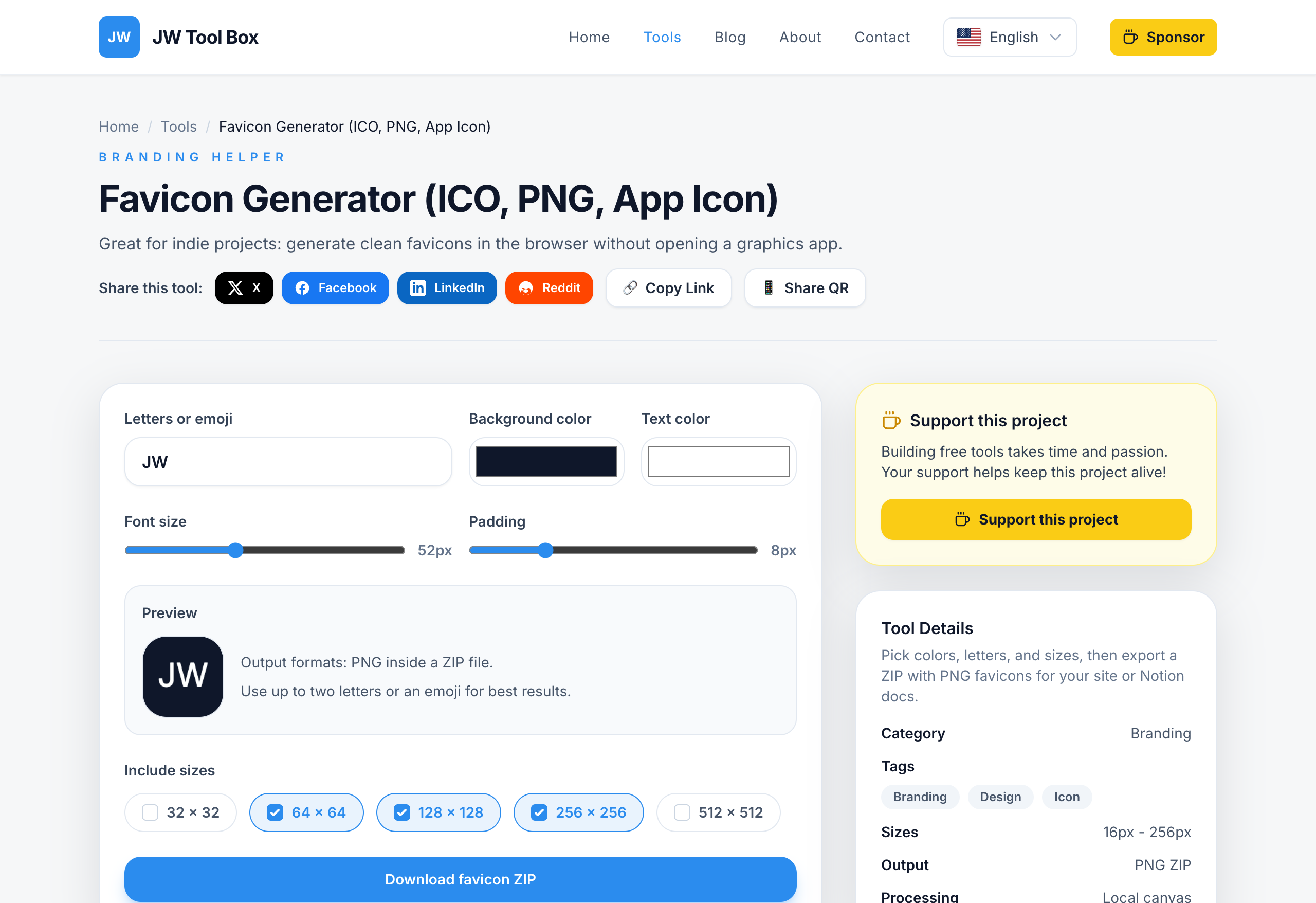
- Start with a high-contrast mark.
- Export the PNG sizes you need.
- If your stack requires
favicon.ico, generate that as a separate build step or with your existing asset pipeline. - Wire the final files into your site head or manifest.
The generator offers 16, 32, 48, 64, 96, 128, 180, 192, 256 and 512px PNGs. Select the sizes for your destination and download one ZIP. Each file is named favicon-SIZE.png; use this mapping for the examples below:
| Downloaded file | Path used in the example |
|---|---|
favicon-32.png |
/favicon-32.png |
favicon-96.png |
/favicon-96.png |
favicon-180.png |
Rename to /apple-touch-icon.png |
favicon-192.png |
Rename to /icon-192.png |
favicon-512.png |
Rename to /icon-512.png |
Alternatively, keep the exported filenames and update the HTML or manifest paths. To resize existing artwork, use the Image Resizer. These exports are PNGs: renaming one to .ico does not convert its format.
If you are working from a text or emoji-based mark, test the icon at the smallest preview size before you worry about the larger exports.
Configuration for Google, Apple and PWA icons
The picker above changes its checklist and code for each destination. These examples are also available here without the picker. Create the image files first, and make the declared sizes match their actual dimensions.
Google Search: a 96x96 PNG example
Add this link to the homepage's HTML head, use a stable icon URL, and allow Google to crawl both the homepage and the image:
<link rel="icon" type="image/png" sizes="96x96" href="/favicon-96.png">
96x96 is a practical choice, not a mandatory size. Google's minimum is 8x8, with a recommendation for larger than 48x48. An eligible icon is not guaranteed to appear, and a new file does not update search results immediately.
Apple home screen: a 180x180 PNG example
<link rel="apple-touch-icon" sizes="180x180" href="/apple-touch-icon.png">
This is a common iPhone setup, not a promise of exact coverage for every Apple device. The home-screen icon has a different role from the small browser-tab icon. See Apple's Web Clip icon documentation.
Android / PWA: link a manifest and declare the files
In the HTML head:
<link rel="manifest" href="/site.webmanifest">
Merge these icons into your existing manifest. Keep its other fields, such as the app name and start URL:
{
  "icons": [
    { "src": "/icon-192.png", "sizes": "192x192", "type": "image/png", "purpose": "any" },
    { "src": "/icon-512.png", "sizes": "512x512", "type": "image/png", "purpose": "any" }
  ]
}
These are ordinary icons. A separately designed maskable icon needs its own entry. This icons-only example does not make a site installable on its own; see MDN's manifest icons reference.
Check the exported files and paths
- Open each exported image and confirm it is square and has the declared pixel dimensions.
- Visit each image path directly on your site. It must return the image, not an HTML fallback or a 404 page.
- Check that your homepage includes the icon link, and that the manifest link points to the correct JSON file.
- Test the browser tab and the home-screen or installation flow on the devices you support. Their icons may be cached separately.
- Keep Google's crawlability rules in mind when an icon is missing from search results; changing dimensions alone does not establish a ranking improvement.
Common Favicon Mistakes
- using a detailed logo that collapses at 16 to 32 px
- forgetting the Apple touch icon
- shipping only one oversized PNG and assuming every platform will scale it perfectly
- keeping transparent padding that makes the icon look tiny in a browser tab
- never checking the favicon in a real tab after export
Base64 Favicons: Useful, but Not the Whole Strategy
If you want to inline a tiny fallback favicon in HTML, read How to Embed Base64 Favicons in HTML. That can reduce one small request, but it does not replace your Apple touch icon, manifest icons, or normal PNG assets.
What Is the Smallest Valid favicon.ico?
For a real project, the practical answer is still simple: ship a normal favicon.ico that includes at least a 16x16 and 32x32 layer, then add PNG and Apple touch icons for modern devices.
If you are searching for a minimal valid favicon.ico file, small favicon.ico bytes, or a 16x16 favicon base64 fallback, you are usually solving one of two problems:
- You need the tiniest possible legacy fallback for a demo, test page, or generated HTML file.
- You want to inline a tiny icon in the document head to avoid one extra request.
The important distinction is that a minimal favicon.ico is not the same thing as a complete favicon setup. A tiny 16x16 fallback can satisfy legacy browser behavior, but it will still look weak in pinned tabs, app launchers, and install prompts.
If your goal is a minimal valid favicon.ico base64 16x16 setup, use it only as the fallback layer. Keep your normal PNG and manifest assets in place for everything else. The safer pattern is:
<link rel="icon" href="/favicon.ico" sizes="any">
<link rel="icon" type="image/png" sizes="32x32" href="/icon-32.png">
Then, if you really want an inline fallback for experiments or micro-pages, pair this guide with Minimal Valid favicon.ico Examples, grab ready-to-copy hex bytes and Base64 strings from the Minimal favicon.ico Hex Bytes & Base64 guide, or read How to Embed Base64 Favicons in HTML instead of replacing the whole favicon stack.
FAQ
What is a maskable favicon?
It is an icon designed for Android adaptive crops. Keep essential artwork inside a centered circle whose diameter is 80% of the canvas width, and declare the separately prepared image with "purpose": "maskable" in your manifest.
Does favicon size affect SEO or ranking?
Favicon eligibility is separate from search ranking. Follow Google’s size and crawlability guidance above; changing icon dimensions alone does not establish a ranking improvement.
Do I still need favicon.ico?
It is still a sensible fallback, but it is no longer the whole favicon strategy.
What size matters most for modern sites?
180x180, 192x192, and 512x512 are the important modern assets, with 32x32 still useful for desktop tabs.
What is the best favicon size for browser tabs?
Use a crisp 32x32 PNG plus a favicon.ico fallback that includes 16x16 and 32x32 layers.
Do I need 16x16, 32x32, 48x48, and 64x64?
Not always. A multi-size ICO can include extra layers, but most modern sites can start with 16x16 and 32x32 in the ICO, then rely on PNG files for larger touch and PWA icons.
Can I use only SVG?
Not as your only format. SVG is a great extra layer, but PNG assets are still the safer baseline.
Ready to refresh your icon set? Open the Favicon Generator and start with the PNG exports your project actually needs.
About the author
JW Tool Box - Editorial and product review team
JW Tool Box publishes hands-on guides tied directly to the site's browser-based tools. Content is updated when browser behavior, platform rules, or product requirements change in ways that affect real workflows. The goal is to provide practical instructions, tested defaults, and trustworthy reference content instead of thin keyword filler.
Related guides
-
Minimal Valid favicon.ico: Tiny 16x16 Fallbacks, Base64, and Real Examples (2026)
If you are searching for a minimal valid favicon.ico, you usually do not want a full design-system discussion. You want the smallest setup that still works without breaking browser fallbacks. That is a narrower problem than a normal favicon guide, and the answer is also narrower: a tiny fallback can be valid, but it is not a complete favicon strategy. TL;DR — A minimal favicon setup can be as…
-
How to Embed Base64 Favicons in HTML (Zero HTTP Requests)
Inlining a favicon with Base64 can remove one request for a tiny fallback icon. It is not a universal performance improvement: the encoded data adds to the HTML and cannot be cached as a separate image file. For a normal website, use the favicon size guide and setup picker to choose your browser, Apple and PWA assets first. The important part is understanding what to inline and what not to inl…
Related tools
Additional browser-based utilities that are closely related to this workflow.
-
Favicon Generator (PNG, Multi-Size)
Generate crisp favicon PNGs locally and export a ZIP.
-
Image Resizer: Resize JPG, PNG, and WebP
Resize images to exact dimensions and convert to WebP, JPEG, or PNG entirely in your browser.